> ## Documentation Index
> Fetch the complete documentation index at: https://wundergraphinc-brendan-add-sof-link.mintlify.site/llms.txt
> Use this file to discover all available pages before exploring further.
# Cosmo MCP Server
> The Cosmo MCP Server allows developers to integrate Cosmo into their modern LLM/AI supported IDEs.
## Overview
The Cosmo MCP Server allows developers to integrate Cosmo into their modern LLM/AI supported IDEs.
The implementation is running fully on the client side using STDIO.
As such, the MCP Server requires no additional setup on your machine other than setting up the `wgc` CLI tool with an API key.
## Installation
To install the MCP Server, you'll need to create an API key and configure your IDE to use it.
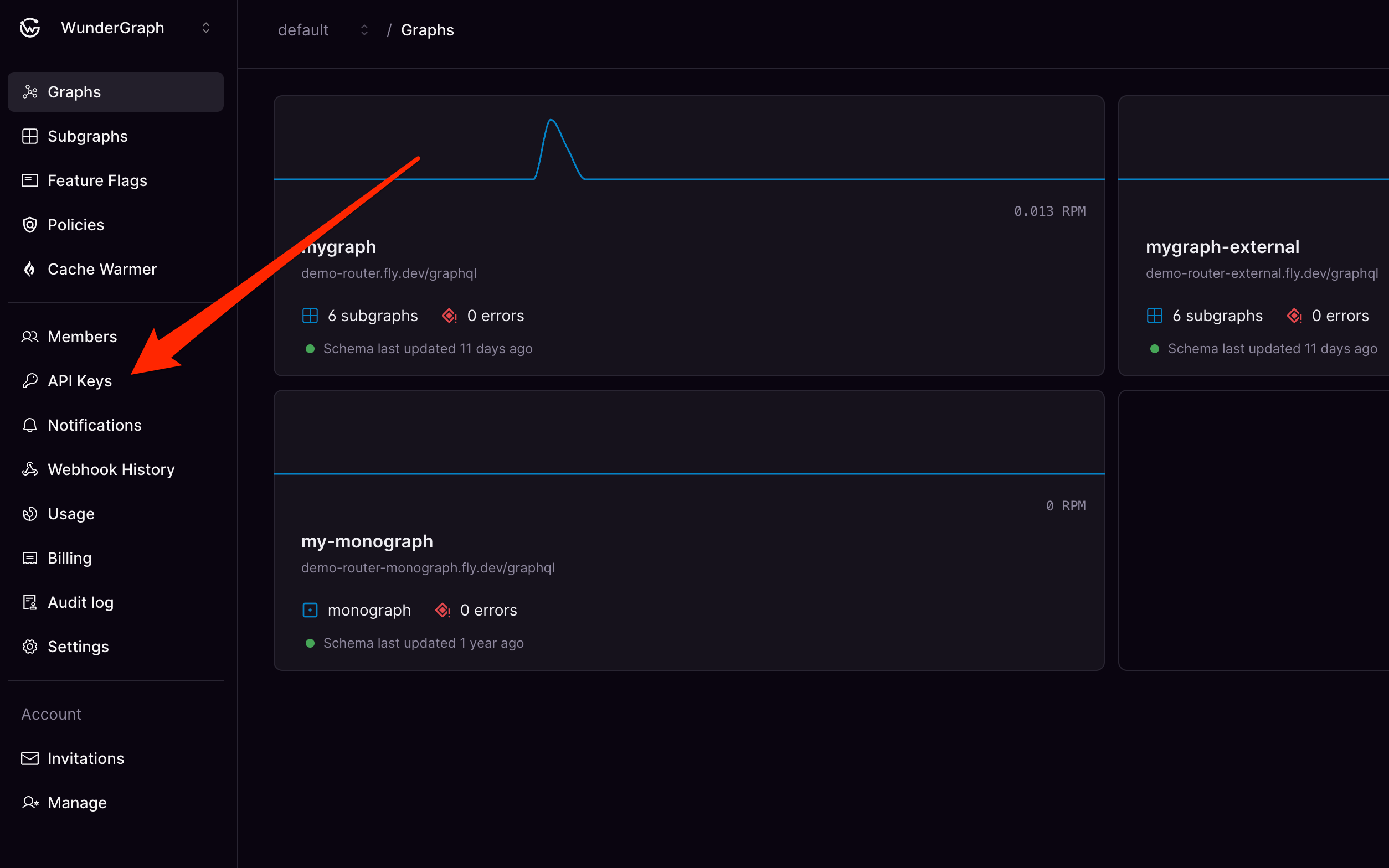
### 1. Create a new API key
You can create an API key in [Cosmo Studio](https://cosmo.wundergraph.com).
 ### 2. Configure your IDE
Add the following configuration to your IDE's settings.
You'll need to replace `cosmo_` with your actual API key.
```json theme={null}
{
"mcpServers": {
"cosmo": {
"command": "npx wgc",
"args": ["mcp"],
"env": {
"COSMO_API_KEY": "cosmo_"
}
}
}
}
```
## Useful Prompts
Here are some example prompts you can use to get started.
### Setting the Context
```
For the whole conversation,
if not otherwise specified,
assume that we're always working in the context of the
Namespace "default"
and the Supergraph "mygraph".
```
### Schema Exploration
*Load the schema of the Supergraph and summarize the core features*
```
Supergraph: mygraph
Namespace: default
Show me the core features of this Supergraph.
```
***
*Find out which subgraphs are part of the Supergraph*
```
Supergraph: mygraph
Namespace: default
Which subgraphs are part of this Supergraph?
```
***
*Load the SDL of the Supergraph*
```
Supergraph: mygraph
Namespace: default
Show me the schema for this Supergraph.
```
***
*Explore sub-sections of the Supergraph schema*
```
Supergraph: mygraph
Namespace: default
Show me the schema for the Employee type in this Supergraph.
```
### Dream Query Workflow
```
Supergraph: mygraph
Namespace: default
Use the dream_query_workflow
to enable the following query
on this Supergraph:
query {
employees {
name
department {
name
}
}
}
```
The dream\_query\_workflow guides the AI model through the process of adding the necessary schema changes to your Subgraphs to enable a new use case in your Supergraph.
It will find out which Subgraphs are best to modify,
and it will verify that the changes are composable and backwards compatible.
### Schema Change Proposal Workflow
```
Supergraph: mygraph
Namespace: default
Use the schema_change_proposal_workflow
to add the field "age: Int!"
to the "Employee" type
in this Supergraph.
```
This workflow is a sub-workflow of the dream\_query\_workflow.
Instead of starting from a query,
it starts with instructions on what specifically to change in the schema.
### AI-assisted Router Configuration
*Use the Router Config Reference to make changes to the Router config*
```
Look into the cosmo_router_config_reference
and help me to configure a custom GraphQL endpoint
in my Router config: router.yaml
```
***
*Use the Router Config Reference to enable WebSockets*
```
Look into the cosmo_router_config_reference
and help me to enable WebSockets
in my Router config: router.yaml
```
### Documentation Search
*Use fulltext search on the documentation to enable specific features in the Router config*
```
Look into the cosmo documentation
and help me to properly configure CORS
in my Router config: router.yaml
```
***
*Use fulltext search on the documentation to understand the steps to publish a Subgraph*
```
Look into the cosmo documentation
and explain to me the steps to publish a Subgraph.
```
## All Available Tools (Reference)
The MCP server exposes several tools that an AI model can utilize:
### Subgraph Management
* **`list_subgraphs`**: Lists all subgraphs registered in your Cosmo Platform instance.
* *Use Case*: Discovering available subgraphs.
* **`get_subgraphs`**: Retrieves detailed information for specified subgraphs, including their GraphQL Schema Definition Language (SDL).
* *Use Case*: Inspecting the schema or configuration of specific subgraphs.
* **`introspect_subgraph`**: Introspects a running subgraph endpoint to retrieve its current GraphQL schema.
* *Use Case*: Fetching the latest schema directly from a subgraph instance, useful for verifying deployments or comparing against registered schemas.
* **`subgraph_verify_schema_changes`**: Validates proposed changes to a subgraph's schema. It checks for valid GraphQL SDL, composition compatibility with other subgraphs, and potential breaking changes against client traffic (optional).
* *Use Case*: Safely validating schema modifications before deployment.
### Supergraph (Federated Graph) Management
* **`list_supergraphs`**: Lists all federated graphs (Supergraphs) in your Cosmo Platform instance, optionally filtered by namespace.
* *Use Case*: Discovering available Supergraphs.
* **`fetch_supergraph`**: Fetches the composed schema (SDL and client schema) and configuration details for a specific Supergraph.
* *Use Case*: Examining the structure and configuration of a Supergraph.
* **`fetch_supergraph_router_config`**: Retrieves the router configuration (e.g., for WunderGraph Cosmo Router) for a specific Supergraph.
* *Use Case*: Obtaining the necessary configuration to run a compatible router instance.
* **`fetch_supergraph_subgraphs`**: Fetches a list of all subgraphs that are part of a specific Supergraph, including their individual schemas and routing information.
* *Use Case*: Understanding the composition of a Supergraph and its constituent subgraphs.
### Schema Evolution & Query Workflows
* **`schema_change_proposal_workflow`**: Generates a step-by-step guide or set of instructions for making a specific schema change to a Supergraph safely and effectively.
* *Use Case*: Assisting developers in planning and executing schema changes.
* **`dream_query_workflow`**: Takes a desired GraphQL query and generates instructions on the necessary schema modifications across relevant subgraphs to support that query within a Supergraph.
* *Use Case*: Streamlining the process of evolving the Supergraph schema to meet new data requirements expressed via GraphQL queries.
* **`verify_query_against_remote_schema`**: Validates a given GraphQL query against the schema of a deployed Supergraph in your Cosmo Platform instance.
* *Use Case*: Checking if a query is valid before integrating it into an application.
* **`verify_query_against_in_memory_schema`**: Validates a given GraphQL query against a provided Supergraph schema string (e.g., a locally composed schema).
* *Use Case*: Testing queries against local or proposed schema changes without needing a deployed Supergraph.
### Supergraph Changelog
* **`supergraph_changelog`**: Fetches the changelog for a federated graph / Supergraph.
* *Use Case*: Reviewing the history of schema changes and composition updates for a Supergraph.
### Router Configuration Verification
* **`verify_router_config`**: Verifies a provided Cosmo Router configuration (JSON or YAML) for validity.
* *Use Case*: Ensuring a proposed router configuration is syntactically correct and valid before deployment.
* **`cosmo_router_config_reference`**: Provides a reference for the Cosmo Router configuration.
* *Use Case*: Understanding the syntax and structure of the Cosmo Router configuration.
### Documentation Search
* **`search_docs`**: Searches the official WunderGraph Cosmo documentation for a given query.
* *Use Case*: Finding relevant documentation pages for specific features, concepts, or troubleshooting steps.
### 2. Configure your IDE
Add the following configuration to your IDE's settings.
You'll need to replace `cosmo_` with your actual API key.
```json theme={null}
{
"mcpServers": {
"cosmo": {
"command": "npx wgc",
"args": ["mcp"],
"env": {
"COSMO_API_KEY": "cosmo_"
}
}
}
}
```
## Useful Prompts
Here are some example prompts you can use to get started.
### Setting the Context
```
For the whole conversation,
if not otherwise specified,
assume that we're always working in the context of the
Namespace "default"
and the Supergraph "mygraph".
```
### Schema Exploration
*Load the schema of the Supergraph and summarize the core features*
```
Supergraph: mygraph
Namespace: default
Show me the core features of this Supergraph.
```
***
*Find out which subgraphs are part of the Supergraph*
```
Supergraph: mygraph
Namespace: default
Which subgraphs are part of this Supergraph?
```
***
*Load the SDL of the Supergraph*
```
Supergraph: mygraph
Namespace: default
Show me the schema for this Supergraph.
```
***
*Explore sub-sections of the Supergraph schema*
```
Supergraph: mygraph
Namespace: default
Show me the schema for the Employee type in this Supergraph.
```
### Dream Query Workflow
```
Supergraph: mygraph
Namespace: default
Use the dream_query_workflow
to enable the following query
on this Supergraph:
query {
employees {
name
department {
name
}
}
}
```
The dream\_query\_workflow guides the AI model through the process of adding the necessary schema changes to your Subgraphs to enable a new use case in your Supergraph.
It will find out which Subgraphs are best to modify,
and it will verify that the changes are composable and backwards compatible.
### Schema Change Proposal Workflow
```
Supergraph: mygraph
Namespace: default
Use the schema_change_proposal_workflow
to add the field "age: Int!"
to the "Employee" type
in this Supergraph.
```
This workflow is a sub-workflow of the dream\_query\_workflow.
Instead of starting from a query,
it starts with instructions on what specifically to change in the schema.
### AI-assisted Router Configuration
*Use the Router Config Reference to make changes to the Router config*
```
Look into the cosmo_router_config_reference
and help me to configure a custom GraphQL endpoint
in my Router config: router.yaml
```
***
*Use the Router Config Reference to enable WebSockets*
```
Look into the cosmo_router_config_reference
and help me to enable WebSockets
in my Router config: router.yaml
```
### Documentation Search
*Use fulltext search on the documentation to enable specific features in the Router config*
```
Look into the cosmo documentation
and help me to properly configure CORS
in my Router config: router.yaml
```
***
*Use fulltext search on the documentation to understand the steps to publish a Subgraph*
```
Look into the cosmo documentation
and explain to me the steps to publish a Subgraph.
```
## All Available Tools (Reference)
The MCP server exposes several tools that an AI model can utilize:
### Subgraph Management
* **`list_subgraphs`**: Lists all subgraphs registered in your Cosmo Platform instance.
* *Use Case*: Discovering available subgraphs.
* **`get_subgraphs`**: Retrieves detailed information for specified subgraphs, including their GraphQL Schema Definition Language (SDL).
* *Use Case*: Inspecting the schema or configuration of specific subgraphs.
* **`introspect_subgraph`**: Introspects a running subgraph endpoint to retrieve its current GraphQL schema.
* *Use Case*: Fetching the latest schema directly from a subgraph instance, useful for verifying deployments or comparing against registered schemas.
* **`subgraph_verify_schema_changes`**: Validates proposed changes to a subgraph's schema. It checks for valid GraphQL SDL, composition compatibility with other subgraphs, and potential breaking changes against client traffic (optional).
* *Use Case*: Safely validating schema modifications before deployment.
### Supergraph (Federated Graph) Management
* **`list_supergraphs`**: Lists all federated graphs (Supergraphs) in your Cosmo Platform instance, optionally filtered by namespace.
* *Use Case*: Discovering available Supergraphs.
* **`fetch_supergraph`**: Fetches the composed schema (SDL and client schema) and configuration details for a specific Supergraph.
* *Use Case*: Examining the structure and configuration of a Supergraph.
* **`fetch_supergraph_router_config`**: Retrieves the router configuration (e.g., for WunderGraph Cosmo Router) for a specific Supergraph.
* *Use Case*: Obtaining the necessary configuration to run a compatible router instance.
* **`fetch_supergraph_subgraphs`**: Fetches a list of all subgraphs that are part of a specific Supergraph, including their individual schemas and routing information.
* *Use Case*: Understanding the composition of a Supergraph and its constituent subgraphs.
### Schema Evolution & Query Workflows
* **`schema_change_proposal_workflow`**: Generates a step-by-step guide or set of instructions for making a specific schema change to a Supergraph safely and effectively.
* *Use Case*: Assisting developers in planning and executing schema changes.
* **`dream_query_workflow`**: Takes a desired GraphQL query and generates instructions on the necessary schema modifications across relevant subgraphs to support that query within a Supergraph.
* *Use Case*: Streamlining the process of evolving the Supergraph schema to meet new data requirements expressed via GraphQL queries.
* **`verify_query_against_remote_schema`**: Validates a given GraphQL query against the schema of a deployed Supergraph in your Cosmo Platform instance.
* *Use Case*: Checking if a query is valid before integrating it into an application.
* **`verify_query_against_in_memory_schema`**: Validates a given GraphQL query against a provided Supergraph schema string (e.g., a locally composed schema).
* *Use Case*: Testing queries against local or proposed schema changes without needing a deployed Supergraph.
### Supergraph Changelog
* **`supergraph_changelog`**: Fetches the changelog for a federated graph / Supergraph.
* *Use Case*: Reviewing the history of schema changes and composition updates for a Supergraph.
### Router Configuration Verification
* **`verify_router_config`**: Verifies a provided Cosmo Router configuration (JSON or YAML) for validity.
* *Use Case*: Ensuring a proposed router configuration is syntactically correct and valid before deployment.
* **`cosmo_router_config_reference`**: Provides a reference for the Cosmo Router configuration.
* *Use Case*: Understanding the syntax and structure of the Cosmo Router configuration.
### Documentation Search
* **`search_docs`**: Searches the official WunderGraph Cosmo documentation for a given query.
* *Use Case*: Finding relevant documentation pages for specific features, concepts, or troubleshooting steps.