> ## Documentation Index
> Fetch the complete documentation index at: https://wundergraphinc-brendan-add-sof-link.mintlify.site/llms.txt
> Use this file to discover all available pages before exploring further.
# MCP Gateway
> Technical guide for using WunderGraph’s MCP Gateway to connect GraphQL APIs to AI models. Covers setup, configuration, and usage examples.
# AI Integration with Model Context Protocol (MCP)
For a high-level introduction, see the [MCP Gateway overview](https://wundergraph.com/mcp-gateway).
WunderGraph’s MCP Gateway is a feature of the Cosmo Router that enables AI models to interact with your GraphQL APIs using a structured protocol. This guide explains how to configure and use MCP safely and effectively.
 ## What is MCP?
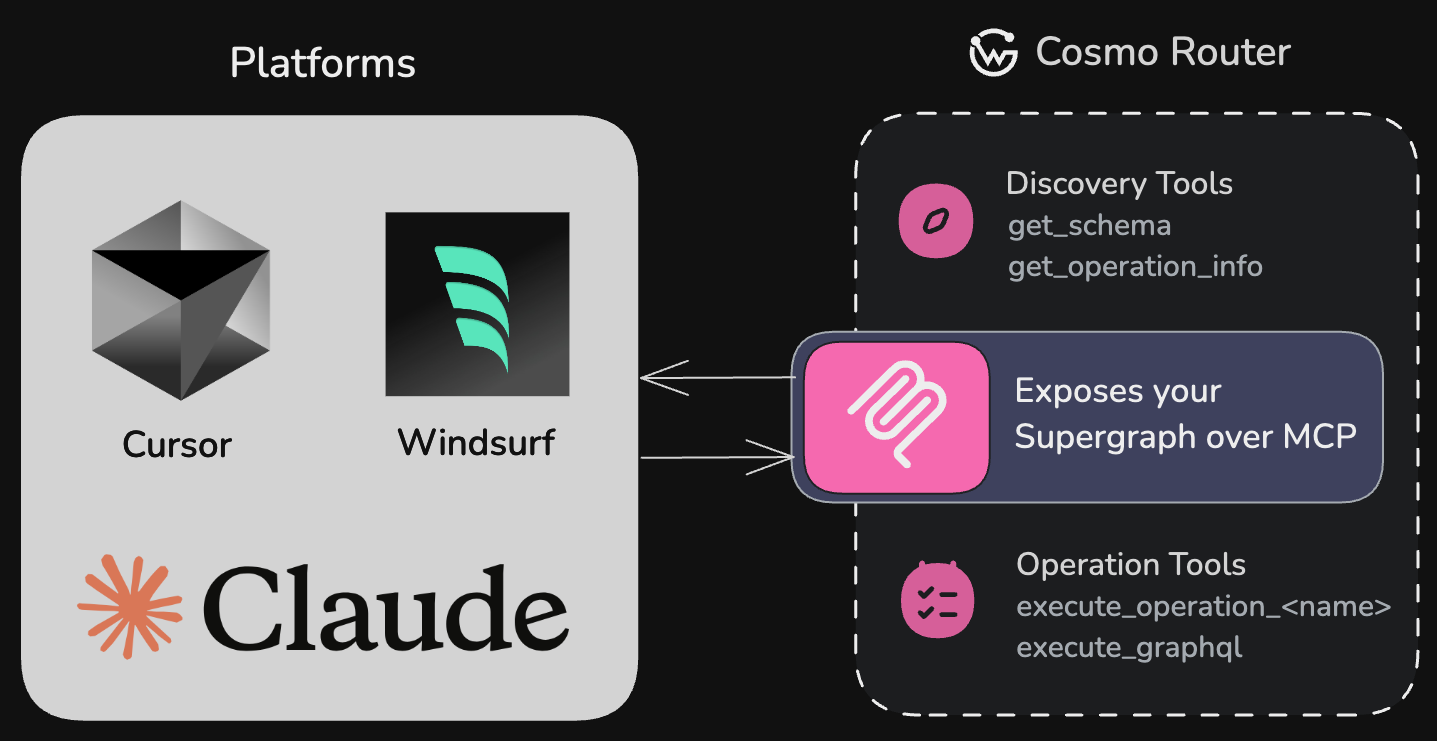
MCP (Model Context Protocol) is a protocol designed to help AI models interact with your APIs by providing context, schema information, and a standardized interface. The Cosmo Router implements an MCP server that exposes your GraphQL operations as tools that AI models can use.
MCP enables AI models to understand and interact with your GraphQL API without
requiring custom integration code for each model.
We support only the latest MCP specification `2025-06-18` with Streamable HTTP
support.
The Cosmo MCP Server builds on top of the concept of persisted operations (also known as persisted queries or trusted documents). Instead of allowing AI models to execute arbitrary GraphQL operations, it exposes a predefined set of validated and approved operations. This provides a secure and controlled way for AI systems to interact with your data while maintaining tight control over what operations can be executed.
## Capabilities Provided by MCP
Make your GraphQL API automatically discoverable by AI models like OpenAI,
Claude, and Cursor
Provide detailed schema information and input requirements for each
operation
Enable controlled, precise access to your data with operation-level
granularity
Empower AI assistants to work with your application's data through a
standardized interface
## Why Use GraphQL with MCP?
The integration of GraphQL with MCP creates a uniquely powerful system for AI-API interactions:
* **Precise data selection**: GraphQL's nature allows you to define exactly what data AI models can access, from simple queries to complex operations across your entire graph.
* **Declarative operation definition**: Create purpose-built `.graphql` files with operations tailored specifically for AI consumption. These function as persisted operations (trusted documents), giving you complete control over what queries AI models can execute.
* **Self-documenting operations**: Using the September 2025 GraphQL spec, you can embed rich descriptions directly in your operation definitions, making them immediately understandable to AI models without external documentation.
* **Flexible data exposure**: Control exactly which operations and fields are exposed to AI systems with granular precision.
* **Compositional API design**: Build different operation sets for different AI use cases without changing your underlying API.
* **Runtime safety**: GraphQL's strong typing ensures AI models can only request valid data patterns that match your schema.
* **Built-in validation**: Operation validation prevents malformed queries from ever reaching your backend systems.
* **Evolve without breaking**: Change your underlying data model while maintaining stable AI-facing operations.
* **Federation-ready**: Works seamlessly with federated GraphQL schemas, giving AI access to data across your entire organization.
But what does this mean in practice? How do these technical benefits translate to real-world solutions? To truly understand the transformative power of GraphQL with MCP, let's explore a common scenario that organizations face when integrating AI with their existing systems.
## Real-World Example: AI Integration in Finance
A large financial services company needed to integrate AI assistants into their support workflow—but faced a critical problem: how to allow access to transaction data without exposing sensitive financial details or breaching compliance.
Without proper data boundaries, AI models might inadvertently access or expose
sensitive customer information, creating security and compliance risks.
Their existing REST APIs posed three major challenges:
1. **Security vulnerabilities**: Their existing REST endpoints contained mixed sensitive and non-sensitive data, making them unusable for AI integration without major restructuring.
2. **Development bottlenecks**: Their engineering team estimated 6+ months to create and maintain a parallel "AI-safe" REST API, delaying their AI initiative significantly.
3. **Data governance issues**: Without granular control, they couldn't meet regulatory requirements for tracking and limiting what data AI systems could access.
### Using GraphQL and MCP to Define a Safe Access Layer
The team adopted GraphQL with the Model Context Protocol (MCP) to expose only specific operations tailored for AI access. By using operation descriptions (following the September 2025 GraphQL spec), they could provide clear context to AI models about what each operation does and its limitations:
```graphql theme={null}
"""
Retrieves recent transaction history for a customer account.
Returns only non-sensitive transaction details suitable for AI assistant responses.
Excludes: account numbers, routing information, precise location data, and full merchant details.
Use this to answer customer questions about recent purchases and payment status.
"""
query GetTransactionHistory($accountId: ID!, $last: Int!) {
account(id: $accountId) {
transactions(last: $last) {
id
date
merchantNameMasked
category
amount
status
}
}
}
```
The operation description becomes the tool description that AI models see, helping them understand:
* What data the operation provides
* What sensitive information is excluded
* When to use this operation appropriately
This allowed the company to:
* Accelerate compliance review by clearly documenting what data AI could access in the operation definitions themselves
* Avoid duplicating APIs, using GraphQL's type system and persisted operations
* Enforce operational boundaries through schema validation and mutation exclusion
* Provide self-documenting operations that AI models could understand without external documentation
* Scale safely by exposing new fields to AI only when explicitly approved
With this model in place, AI assistants could answer questions like "Did my payment to Amazon go through?" using only the approved fields and without touching full account numbers, balance history, or other restricted data.
### Outcome
This approach helped the company:
* Achieve compliance sign-off in weeks instead of months
* Reduce security review effort by 95%
* Maintain a single source of truth for internal and AI clients
* Future-proof their integration as the API evolved
By combining GraphQL and MCP, they enabled a secure, flexible interface for AI models without having to rewrite their backend.
## How It Works
The Cosmo Router server:
1. Loads GraphQL operations from a specified directory
2. Validates them against your schema
3. Generates JSON schemas for operation variables
4. Exposes these operations as tools that AI models can discover and use
5. Handles execution of operations when called by AI models
When an AI model interacts with your MCP endpoint:
1. It discovers available GraphQL operations as tools and their descriptions
2. Reads the tool descriptions to understand what each operation does, what data it returns, and when to use it
3. Understands input requirements through the JSON schema
4. Executes tools with appropriate parameters
5. Receives structured data that it can interpret and use in its responses
## Built-in MCP Tools
The MCP server provides several tools out of the box to help AI models discover and interact with your GraphQL API:
### Discovery Tools
Retrieves detailed information about a specific GraphQL operation, including
its input schema, query structure, and execution guidance. AI models use
this to understand how to properly call an operation in real-world
scenarios.
Provides the full GraphQL schema as a string. This helps AI models
understand the entire API structure. This tool is only available if
`expose_schema` is enabled.
### Execution Tools
Executes arbitrary GraphQL queries or mutations against your API. This tool is only available if `enable_arbitrary_operations` is enabled, allowing AI models to craft and execute custom operations beyond predefined ones.
For each GraphQL operation in your operations directory, the MCP server automatically generates a corresponding execution tool with the pattern `execute_operation_` (e.g., `execute_operation_get_users`).
## Tool Naming and Schema Generation
The operation execution tools provide a structured and controlled way for AI models to interact with your API:
* **Tool naming**: Tools follow the pattern `execute_operation_` (with operation names converted to snake\_case)
* **Tool schema**: Generated from your GraphQL operation's variables, ensuring type safety
* **Tool description**: Extracted from your GraphQL operation's description string (following the September 2025 GraphQL spec) or from comment-based descriptions. The description provides context to help AI models understand the operation's purpose.
* **Mutation warnings**: Tools for mutation operations include a warning that the operation has side effects
By default, all operations in your specified directory will be exposed as tools. Use the `exclude_mutations: true` configuration option to prevent mutation operations from being exposed if you want to ensure AI models can only read data.
## Configuration
To enable MCP in your Cosmo Router, add the following configuration to your `config.yaml`:
```yaml theme={null}
mcp:
enabled: true
server:
listen_addr: "localhost:5025"
router_url: "https://your-public-router-url.example.com/graphql" # Optional: Used in MCP responses when your router is behind a proxy
storage:
provider_id: "mcp" # References a file_system provider defined below
session:
stateless: true # Optional: When true, no server-side session state is kept
graph_name: "my-graph"
exclude_mutations: true
enable_arbitrary_operations: false
expose_schema: false
omit_tool_name_prefix: false # When true: GetUser → get_user (no execute_operation_ prefix)
# Configure storage providers
storage_providers:
file_system:
- id: "mcp"
path: "operations" # Relative to the router binary
```
### Configuration Options
| Option | Description | Default |
| ----------------------------- | -------------------------------------------------------------------------------------------------------------------------------------------------------------------------------------------------------------------------------------------------------------------------------------------------------------------------------------------------------------- | ---------------- |
| `enabled` | Enable or disable the MCP server | `false` |
| `server.listen_addr` | The address and port where the MCP server will listen for requests | `localhost:5025` |
| `router_url` | Custom URL to use for the router GraphQL endpoint in MCP responses. Use this when your router is behind a proxy. | - |
| `storage.provider_id` | The ID of a storage provider to use for loading GraphQL operations. Only file\_system providers are supported. | - |
| `session.stateless` | Whether the MCP server should operate in stateless mode. When true, no server-side session state is maintained between requests. | `true` |
| `graph_name` | The name of the graph this router exposes via MCP. Used to build the MCP server name (wundergraph-cosmo-\$graph\_name) and for logging; it does not select a different graph. | `mygraph` |
| `exclude_mutations` | Whether to exclude mutation operations from being exposed | `false` |
| `enable_arbitrary_operations` | Whether to allow arbitrary GraphQL operations to be executed. Security risk: Should only be enabled in secure, internal environments. | `false` |
| `expose_schema` | Whether to expose the full GraphQL schema. Security risk: Should only be enabled in secure, internal environments. | `false` |
| `omit_tool_name_prefix` | When enabled, MCP tool names generated from GraphQL operations omit the `execute_operation_` prefix. For example, the GraphQL operation `GetUser` results in a tool named `get_user` instead of `execute_operation_get_user`. This produces shorter tool names and is entirely optional. Can also be set via `MCP_OMIT_TOOL_NAME_PREFIX` environment variable. | `false` |
## Session Handling
By default, the MCP server runs in stateless mode (`session.stateless: true`). This avoids scalability issues in load‑balanced or serverless environments where sticky sessions may not be guaranteed. In stateless mode, no session data is retained between requests.
In stateless mode, features that rely on long‑lived connections or server‑side session state are unavailable or limited:
* No sampling
* No elicitation flows
* No session resumability
* No bidirectional messaging (e.g. Notifications)
### Stateful mode (sticky sessions required)
If you set `session.stateless: false`, the MCP server maintains per‑session state. To ensure all requests for a session reach the same Router instance, configure sticky sessions keyed by `Mcp-Session-Id`:
* The Router returns a unique `Mcp-Session-Id` response header when a session is established.
* Clients must include that value in subsequent requests as the `Mcp-Session-Id` request header.
* Your load balancer or reverse proxy must route requests with the same `Mcp-Session-Id` to the same instance.
For details, see your load balancer or reverse proxy documentation (e.g., [F5 NGINX Plus - MCP Session Affinity](https://community.f5.com/kb/technicalarticles/mcp-session-affinity-with-f5-nginx-plus/341961)).
### Session Storage
In the future, we may add persistent session storage (e.g., Redis) to the MCP server. This would enable shared session state across instances and unlock features such as session‑based security, resource subscriptions, and bidirectional messaging without the need to solve it on the load balancer level.
## Storage Providers
MCP loads operations from a configured file system storage provider. This allows you to centralize the configuration of operation sources:
```yaml theme={null}
storage_providers:
file_system:
- id: "mcp"
path: "operations" # Relative to the router binary
```
Then reference this storage provider in your MCP configuration:
```yaml theme={null}
mcp:
storage:
provider_id: "mcp"
```
A storage provider must be specified to load GraphQL operations.
## Setting Up Operations
1. Create a directory to store your GraphQL operations as specified in your `storage.provider_id` configuration.
2. Add `.graphql` files containing named GraphQL operations.
Each operation file should contain a single named operation. You can provide descriptions for AI models in two ways:
1. **Operation description strings** (recommended, following September 2025 GraphQL spec)
2. **Comment-based descriptions** (legacy approach)
### Example Query Operation with Description String
Create a file `operations/getUsers.graphql`:
```graphql theme={null}
"""
Returns a list of all users in the system with their basic information.
This is a read-only operation that doesn't modify any data.
"""
query GetUsers {
users {
id
name
email
}
}
```
### Example Query Operation with Comment-Based Description
Alternatively, you can use comment-based descriptions:
```graphql theme={null}
# Returns a list of all users in the system with their basic information
# This is a read-only operation that doesn't modify any data
query GetUsers {
users {
id
name
email
}
}
```
### Example Mutation Operation
Create a file `operations/createUser.graphql`:
```graphql theme={null}
"""
Creates a new user in the system.
Required inputs: name and email
"""
mutation CreateUser($name: String!, $email: String!) {
createUser(input: { name: $name, email: $email }) {
id
name
email
}
}
```
### Directory Structure
Here's an example of how your project directory might be structured:
```
my-router-project/
├── config.yaml # Router configuration file
├── operations/ # Operations directory (as configured in storage provider)
│ ├── getUsers.graphql # Query operation
│ ├── createUser.graphql # Mutation operation
│ ├── getUserById.graphql # Query with parameters
└── ...
```
The important points:
* The path in your `storage_providers.file_system.path` should point to the operations directory
* All `.graphql` files in this directory (and subdirectories) will be loaded
* Each file should contain a single named GraphQL operation
### Operation Naming and Tool Generation
The MCP server converts each operation into a corresponding tool:
* Operation name: `GetUsers` → Tool name: `execute_operation_get_users`
* Operation name: `CreateUser` → Tool name: `execute_operation_create_user`
Operations are converted to snake\_case for tool naming consistency.
#### Omitting the Tool Name Prefix
By default, all operation tools include the `execute_operation_` prefix:
* `GetUsers` becomes `execute_operation_get_users`
* `CreateUser` becomes `execute_operation_create_user`
When enabled, the `omit_tool_name_prefix` option generates tool names without this prefix:
```yaml theme={null}
mcp:
enabled: true
omit_tool_name_prefix: true
```
* `GetUsers` becomes `get_users`
* `CreateUser` becomes `create_user`
Enabling this option changes all tool names and may break existing integrations that rely on the `execute_operation_` prefix. Only enable this for new deployments or when you can update all dependent systems.
Operations with names that would collide with built-in MCP tools (`get_schema`, `execute_graphql`, `get_operation_info`) automatically retain the `execute_operation_` prefix to prevent conflicts.
### Best Practices
1. **Meaningful names**: Give operations clear, action-oriented names that describe what they do.
2. **Add descriptions**: Use operation description strings (triple-quoted strings `"""`) following the September 2025 GraphQL spec to describe the operation's purpose, required inputs, and any side effects. These descriptions become the tool descriptions that AI models use to understand your operations.
3. **Use explicit types**: Define all input variables with explicit types to ensure proper validation.
4. **Create focused operations**: Design operations specifically for AI model consumption rather than exposing generic operations.
5. **Security considerations**: For mutation operations, add checks and validations to prevent misuse.
## Header Forwarding
Available since Router [0.260.0](https://github.com/wundergraph/cosmo/releases/tag/router%400.260.0)
The MCP server forwards **all headers** from MCP clients to the Router, including authorization headers, custom headers, and tracing headers. This allows you to:
* Leverage all authentication and authorization capabilities of your Cosmo Router
* Pass custom headers for tracing, debugging, or application-specific purposes
* Maintain consistent security and observability across all API consumers
All headers sent by MCP clients are forwarded through the complete chain: MCP Client -> MCP Server -> Router -> Subgraphs. The router's [header forwarding rules](/router/proxy-capabilities/subgraph-request-header-operations) determine what ultimately reaches your subgraphs.
### Common Use Cases
#### Authentication & Authorization
Pass authorization tokens to secure your GraphQL operations
```json theme={null}
{
"headers": {
"Authorization": "Bearer YOUR_API_KEY"
}
}
```
#### Tracing
Include trace IDs for request correlation and debugging
```json theme={null}
{
"headers": {
"X-Trace-Id": "trace-123",
"X-Request-Id": "req-456"
}
}
```
#### Custom Headers
Pass application-specific headers for business logic
```json theme={null}
{
"headers": {
"X-Tenant-Id": "tenant-abc",
"X-Feature-Flag": "new-feature-enabled"
}
}
```
## Installation Guides
Headers can be configured in various AI tools and environments:
### Claude
Requires latest version of Claude Desktop.
Go to `Settings` > `Developer` and click on `Edit Config`. Add the following to the `claude_desktop_config.json` file:
```json theme={null}
{
"mcpServers": {
"mygraph": {
"command": "npx",
"args": ["-y", "mcp-remote", "http://localhost:5025/mcp"]
}
}
}
```
After that, you need to restart Claude Desktop.
### Cursor
Requires Cursor v0.48.0+ for Streamable HTTP support.
Go to `Settings` > `Tools & Integrations` > `MCP Servers` and add the following to the `mcp.json` file:
```json theme={null}
{
"mcpServers": {
"mygraph": {
"url": "http://localhost:5025/mcp",
"headers": {
"Authorization": "Bearer YOUR_API_KEY", // Optional: Auth
"X-Trace-Id": "cursor-session-123", // Optional: Custom headers
"X-Client": "cursor" // Optional: Client identification
}
}
}
}
```
### Windsurf
Windsurf supports Streamable HTTP servers with a `serverUrl` field:
```json theme={null}
{
"mcpServers": {
"mygraph": {
"serverUrl": "http://localhost:5025/mcp",
"headers": {
"Authorization": "Bearer YOUR_API_KEY", // Optional: Auth
"X-Trace-Id": "windsurf-session-456", // Optional: Custom headers
"X-Client": "windsurf" // Optional: Client identification
}
}
}
}
```
### VS Code
Click `View` > `Command Palette` > `"MCP: Add Server"` and use the URL `http://localhost:5025/mcp` to complete the configuration. For more information, see the [MCP Servers](https://code.visualstudio.com/docs/copilot/chat/mcp-servers) documentation.
### Other MCP-compatible Tools
Other tools and AI models that support the MCP protocol typically provide similar ways to configure authentication headers. Always check the documentation for your specific AI tool for the exact configuration syntax.
## What is MCP?
MCP (Model Context Protocol) is a protocol designed to help AI models interact with your APIs by providing context, schema information, and a standardized interface. The Cosmo Router implements an MCP server that exposes your GraphQL operations as tools that AI models can use.
MCP enables AI models to understand and interact with your GraphQL API without
requiring custom integration code for each model.
We support only the latest MCP specification `2025-06-18` with Streamable HTTP
support.
The Cosmo MCP Server builds on top of the concept of persisted operations (also known as persisted queries or trusted documents). Instead of allowing AI models to execute arbitrary GraphQL operations, it exposes a predefined set of validated and approved operations. This provides a secure and controlled way for AI systems to interact with your data while maintaining tight control over what operations can be executed.
## Capabilities Provided by MCP
Make your GraphQL API automatically discoverable by AI models like OpenAI,
Claude, and Cursor
Provide detailed schema information and input requirements for each
operation
Enable controlled, precise access to your data with operation-level
granularity
Empower AI assistants to work with your application's data through a
standardized interface
## Why Use GraphQL with MCP?
The integration of GraphQL with MCP creates a uniquely powerful system for AI-API interactions:
* **Precise data selection**: GraphQL's nature allows you to define exactly what data AI models can access, from simple queries to complex operations across your entire graph.
* **Declarative operation definition**: Create purpose-built `.graphql` files with operations tailored specifically for AI consumption. These function as persisted operations (trusted documents), giving you complete control over what queries AI models can execute.
* **Self-documenting operations**: Using the September 2025 GraphQL spec, you can embed rich descriptions directly in your operation definitions, making them immediately understandable to AI models without external documentation.
* **Flexible data exposure**: Control exactly which operations and fields are exposed to AI systems with granular precision.
* **Compositional API design**: Build different operation sets for different AI use cases without changing your underlying API.
* **Runtime safety**: GraphQL's strong typing ensures AI models can only request valid data patterns that match your schema.
* **Built-in validation**: Operation validation prevents malformed queries from ever reaching your backend systems.
* **Evolve without breaking**: Change your underlying data model while maintaining stable AI-facing operations.
* **Federation-ready**: Works seamlessly with federated GraphQL schemas, giving AI access to data across your entire organization.
But what does this mean in practice? How do these technical benefits translate to real-world solutions? To truly understand the transformative power of GraphQL with MCP, let's explore a common scenario that organizations face when integrating AI with their existing systems.
## Real-World Example: AI Integration in Finance
A large financial services company needed to integrate AI assistants into their support workflow—but faced a critical problem: how to allow access to transaction data without exposing sensitive financial details or breaching compliance.
Without proper data boundaries, AI models might inadvertently access or expose
sensitive customer information, creating security and compliance risks.
Their existing REST APIs posed three major challenges:
1. **Security vulnerabilities**: Their existing REST endpoints contained mixed sensitive and non-sensitive data, making them unusable for AI integration without major restructuring.
2. **Development bottlenecks**: Their engineering team estimated 6+ months to create and maintain a parallel "AI-safe" REST API, delaying their AI initiative significantly.
3. **Data governance issues**: Without granular control, they couldn't meet regulatory requirements for tracking and limiting what data AI systems could access.
### Using GraphQL and MCP to Define a Safe Access Layer
The team adopted GraphQL with the Model Context Protocol (MCP) to expose only specific operations tailored for AI access. By using operation descriptions (following the September 2025 GraphQL spec), they could provide clear context to AI models about what each operation does and its limitations:
```graphql theme={null}
"""
Retrieves recent transaction history for a customer account.
Returns only non-sensitive transaction details suitable for AI assistant responses.
Excludes: account numbers, routing information, precise location data, and full merchant details.
Use this to answer customer questions about recent purchases and payment status.
"""
query GetTransactionHistory($accountId: ID!, $last: Int!) {
account(id: $accountId) {
transactions(last: $last) {
id
date
merchantNameMasked
category
amount
status
}
}
}
```
The operation description becomes the tool description that AI models see, helping them understand:
* What data the operation provides
* What sensitive information is excluded
* When to use this operation appropriately
This allowed the company to:
* Accelerate compliance review by clearly documenting what data AI could access in the operation definitions themselves
* Avoid duplicating APIs, using GraphQL's type system and persisted operations
* Enforce operational boundaries through schema validation and mutation exclusion
* Provide self-documenting operations that AI models could understand without external documentation
* Scale safely by exposing new fields to AI only when explicitly approved
With this model in place, AI assistants could answer questions like "Did my payment to Amazon go through?" using only the approved fields and without touching full account numbers, balance history, or other restricted data.
### Outcome
This approach helped the company:
* Achieve compliance sign-off in weeks instead of months
* Reduce security review effort by 95%
* Maintain a single source of truth for internal and AI clients
* Future-proof their integration as the API evolved
By combining GraphQL and MCP, they enabled a secure, flexible interface for AI models without having to rewrite their backend.
## How It Works
The Cosmo Router server:
1. Loads GraphQL operations from a specified directory
2. Validates them against your schema
3. Generates JSON schemas for operation variables
4. Exposes these operations as tools that AI models can discover and use
5. Handles execution of operations when called by AI models
When an AI model interacts with your MCP endpoint:
1. It discovers available GraphQL operations as tools and their descriptions
2. Reads the tool descriptions to understand what each operation does, what data it returns, and when to use it
3. Understands input requirements through the JSON schema
4. Executes tools with appropriate parameters
5. Receives structured data that it can interpret and use in its responses
## Built-in MCP Tools
The MCP server provides several tools out of the box to help AI models discover and interact with your GraphQL API:
### Discovery Tools
Retrieves detailed information about a specific GraphQL operation, including
its input schema, query structure, and execution guidance. AI models use
this to understand how to properly call an operation in real-world
scenarios.
Provides the full GraphQL schema as a string. This helps AI models
understand the entire API structure. This tool is only available if
`expose_schema` is enabled.
### Execution Tools
Executes arbitrary GraphQL queries or mutations against your API. This tool is only available if `enable_arbitrary_operations` is enabled, allowing AI models to craft and execute custom operations beyond predefined ones.
For each GraphQL operation in your operations directory, the MCP server automatically generates a corresponding execution tool with the pattern `execute_operation_` (e.g., `execute_operation_get_users`).
## Tool Naming and Schema Generation
The operation execution tools provide a structured and controlled way for AI models to interact with your API:
* **Tool naming**: Tools follow the pattern `execute_operation_` (with operation names converted to snake\_case)
* **Tool schema**: Generated from your GraphQL operation's variables, ensuring type safety
* **Tool description**: Extracted from your GraphQL operation's description string (following the September 2025 GraphQL spec) or from comment-based descriptions. The description provides context to help AI models understand the operation's purpose.
* **Mutation warnings**: Tools for mutation operations include a warning that the operation has side effects
By default, all operations in your specified directory will be exposed as tools. Use the `exclude_mutations: true` configuration option to prevent mutation operations from being exposed if you want to ensure AI models can only read data.
## Configuration
To enable MCP in your Cosmo Router, add the following configuration to your `config.yaml`:
```yaml theme={null}
mcp:
enabled: true
server:
listen_addr: "localhost:5025"
router_url: "https://your-public-router-url.example.com/graphql" # Optional: Used in MCP responses when your router is behind a proxy
storage:
provider_id: "mcp" # References a file_system provider defined below
session:
stateless: true # Optional: When true, no server-side session state is kept
graph_name: "my-graph"
exclude_mutations: true
enable_arbitrary_operations: false
expose_schema: false
omit_tool_name_prefix: false # When true: GetUser → get_user (no execute_operation_ prefix)
# Configure storage providers
storage_providers:
file_system:
- id: "mcp"
path: "operations" # Relative to the router binary
```
### Configuration Options
| Option | Description | Default |
| ----------------------------- | -------------------------------------------------------------------------------------------------------------------------------------------------------------------------------------------------------------------------------------------------------------------------------------------------------------------------------------------------------------- | ---------------- |
| `enabled` | Enable or disable the MCP server | `false` |
| `server.listen_addr` | The address and port where the MCP server will listen for requests | `localhost:5025` |
| `router_url` | Custom URL to use for the router GraphQL endpoint in MCP responses. Use this when your router is behind a proxy. | - |
| `storage.provider_id` | The ID of a storage provider to use for loading GraphQL operations. Only file\_system providers are supported. | - |
| `session.stateless` | Whether the MCP server should operate in stateless mode. When true, no server-side session state is maintained between requests. | `true` |
| `graph_name` | The name of the graph this router exposes via MCP. Used to build the MCP server name (wundergraph-cosmo-\$graph\_name) and for logging; it does not select a different graph. | `mygraph` |
| `exclude_mutations` | Whether to exclude mutation operations from being exposed | `false` |
| `enable_arbitrary_operations` | Whether to allow arbitrary GraphQL operations to be executed. Security risk: Should only be enabled in secure, internal environments. | `false` |
| `expose_schema` | Whether to expose the full GraphQL schema. Security risk: Should only be enabled in secure, internal environments. | `false` |
| `omit_tool_name_prefix` | When enabled, MCP tool names generated from GraphQL operations omit the `execute_operation_` prefix. For example, the GraphQL operation `GetUser` results in a tool named `get_user` instead of `execute_operation_get_user`. This produces shorter tool names and is entirely optional. Can also be set via `MCP_OMIT_TOOL_NAME_PREFIX` environment variable. | `false` |
## Session Handling
By default, the MCP server runs in stateless mode (`session.stateless: true`). This avoids scalability issues in load‑balanced or serverless environments where sticky sessions may not be guaranteed. In stateless mode, no session data is retained between requests.
In stateless mode, features that rely on long‑lived connections or server‑side session state are unavailable or limited:
* No sampling
* No elicitation flows
* No session resumability
* No bidirectional messaging (e.g. Notifications)
### Stateful mode (sticky sessions required)
If you set `session.stateless: false`, the MCP server maintains per‑session state. To ensure all requests for a session reach the same Router instance, configure sticky sessions keyed by `Mcp-Session-Id`:
* The Router returns a unique `Mcp-Session-Id` response header when a session is established.
* Clients must include that value in subsequent requests as the `Mcp-Session-Id` request header.
* Your load balancer or reverse proxy must route requests with the same `Mcp-Session-Id` to the same instance.
For details, see your load balancer or reverse proxy documentation (e.g., [F5 NGINX Plus - MCP Session Affinity](https://community.f5.com/kb/technicalarticles/mcp-session-affinity-with-f5-nginx-plus/341961)).
### Session Storage
In the future, we may add persistent session storage (e.g., Redis) to the MCP server. This would enable shared session state across instances and unlock features such as session‑based security, resource subscriptions, and bidirectional messaging without the need to solve it on the load balancer level.
## Storage Providers
MCP loads operations from a configured file system storage provider. This allows you to centralize the configuration of operation sources:
```yaml theme={null}
storage_providers:
file_system:
- id: "mcp"
path: "operations" # Relative to the router binary
```
Then reference this storage provider in your MCP configuration:
```yaml theme={null}
mcp:
storage:
provider_id: "mcp"
```
A storage provider must be specified to load GraphQL operations.
## Setting Up Operations
1. Create a directory to store your GraphQL operations as specified in your `storage.provider_id` configuration.
2. Add `.graphql` files containing named GraphQL operations.
Each operation file should contain a single named operation. You can provide descriptions for AI models in two ways:
1. **Operation description strings** (recommended, following September 2025 GraphQL spec)
2. **Comment-based descriptions** (legacy approach)
### Example Query Operation with Description String
Create a file `operations/getUsers.graphql`:
```graphql theme={null}
"""
Returns a list of all users in the system with their basic information.
This is a read-only operation that doesn't modify any data.
"""
query GetUsers {
users {
id
name
email
}
}
```
### Example Query Operation with Comment-Based Description
Alternatively, you can use comment-based descriptions:
```graphql theme={null}
# Returns a list of all users in the system with their basic information
# This is a read-only operation that doesn't modify any data
query GetUsers {
users {
id
name
email
}
}
```
### Example Mutation Operation
Create a file `operations/createUser.graphql`:
```graphql theme={null}
"""
Creates a new user in the system.
Required inputs: name and email
"""
mutation CreateUser($name: String!, $email: String!) {
createUser(input: { name: $name, email: $email }) {
id
name
email
}
}
```
### Directory Structure
Here's an example of how your project directory might be structured:
```
my-router-project/
├── config.yaml # Router configuration file
├── operations/ # Operations directory (as configured in storage provider)
│ ├── getUsers.graphql # Query operation
│ ├── createUser.graphql # Mutation operation
│ ├── getUserById.graphql # Query with parameters
└── ...
```
The important points:
* The path in your `storage_providers.file_system.path` should point to the operations directory
* All `.graphql` files in this directory (and subdirectories) will be loaded
* Each file should contain a single named GraphQL operation
### Operation Naming and Tool Generation
The MCP server converts each operation into a corresponding tool:
* Operation name: `GetUsers` → Tool name: `execute_operation_get_users`
* Operation name: `CreateUser` → Tool name: `execute_operation_create_user`
Operations are converted to snake\_case for tool naming consistency.
#### Omitting the Tool Name Prefix
By default, all operation tools include the `execute_operation_` prefix:
* `GetUsers` becomes `execute_operation_get_users`
* `CreateUser` becomes `execute_operation_create_user`
When enabled, the `omit_tool_name_prefix` option generates tool names without this prefix:
```yaml theme={null}
mcp:
enabled: true
omit_tool_name_prefix: true
```
* `GetUsers` becomes `get_users`
* `CreateUser` becomes `create_user`
Enabling this option changes all tool names and may break existing integrations that rely on the `execute_operation_` prefix. Only enable this for new deployments or when you can update all dependent systems.
Operations with names that would collide with built-in MCP tools (`get_schema`, `execute_graphql`, `get_operation_info`) automatically retain the `execute_operation_` prefix to prevent conflicts.
### Best Practices
1. **Meaningful names**: Give operations clear, action-oriented names that describe what they do.
2. **Add descriptions**: Use operation description strings (triple-quoted strings `"""`) following the September 2025 GraphQL spec to describe the operation's purpose, required inputs, and any side effects. These descriptions become the tool descriptions that AI models use to understand your operations.
3. **Use explicit types**: Define all input variables with explicit types to ensure proper validation.
4. **Create focused operations**: Design operations specifically for AI model consumption rather than exposing generic operations.
5. **Security considerations**: For mutation operations, add checks and validations to prevent misuse.
## Header Forwarding
Available since Router [0.260.0](https://github.com/wundergraph/cosmo/releases/tag/router%400.260.0)
The MCP server forwards **all headers** from MCP clients to the Router, including authorization headers, custom headers, and tracing headers. This allows you to:
* Leverage all authentication and authorization capabilities of your Cosmo Router
* Pass custom headers for tracing, debugging, or application-specific purposes
* Maintain consistent security and observability across all API consumers
All headers sent by MCP clients are forwarded through the complete chain: MCP Client -> MCP Server -> Router -> Subgraphs. The router's [header forwarding rules](/router/proxy-capabilities/subgraph-request-header-operations) determine what ultimately reaches your subgraphs.
### Common Use Cases
#### Authentication & Authorization
Pass authorization tokens to secure your GraphQL operations
```json theme={null}
{
"headers": {
"Authorization": "Bearer YOUR_API_KEY"
}
}
```
#### Tracing
Include trace IDs for request correlation and debugging
```json theme={null}
{
"headers": {
"X-Trace-Id": "trace-123",
"X-Request-Id": "req-456"
}
}
```
#### Custom Headers
Pass application-specific headers for business logic
```json theme={null}
{
"headers": {
"X-Tenant-Id": "tenant-abc",
"X-Feature-Flag": "new-feature-enabled"
}
}
```
## Installation Guides
Headers can be configured in various AI tools and environments:
### Claude
Requires latest version of Claude Desktop.
Go to `Settings` > `Developer` and click on `Edit Config`. Add the following to the `claude_desktop_config.json` file:
```json theme={null}
{
"mcpServers": {
"mygraph": {
"command": "npx",
"args": ["-y", "mcp-remote", "http://localhost:5025/mcp"]
}
}
}
```
After that, you need to restart Claude Desktop.
### Cursor
Requires Cursor v0.48.0+ for Streamable HTTP support.
Go to `Settings` > `Tools & Integrations` > `MCP Servers` and add the following to the `mcp.json` file:
```json theme={null}
{
"mcpServers": {
"mygraph": {
"url": "http://localhost:5025/mcp",
"headers": {
"Authorization": "Bearer YOUR_API_KEY", // Optional: Auth
"X-Trace-Id": "cursor-session-123", // Optional: Custom headers
"X-Client": "cursor" // Optional: Client identification
}
}
}
}
```
### Windsurf
Windsurf supports Streamable HTTP servers with a `serverUrl` field:
```json theme={null}
{
"mcpServers": {
"mygraph": {
"serverUrl": "http://localhost:5025/mcp",
"headers": {
"Authorization": "Bearer YOUR_API_KEY", // Optional: Auth
"X-Trace-Id": "windsurf-session-456", // Optional: Custom headers
"X-Client": "windsurf" // Optional: Client identification
}
}
}
}
```
### VS Code
Click `View` > `Command Palette` > `"MCP: Add Server"` and use the URL `http://localhost:5025/mcp` to complete the configuration. For more information, see the [MCP Servers](https://code.visualstudio.com/docs/copilot/chat/mcp-servers) documentation.
### Other MCP-compatible Tools
Other tools and AI models that support the MCP protocol typically provide similar ways to configure authentication headers. Always check the documentation for your specific AI tool for the exact configuration syntax.