> ## Documentation Index
> Fetch the complete documentation index at: https://wundergraphinc-brendan-add-sof-link.mintlify.site/llms.txt
> Use this file to discover all available pages before exploring further.
# Persisted Operations
> Persisted operations, also known as trusted documents, allow you to register trusted operations in the router
**Persisted operations** allow you to register queries / mutations / subscriptions within a federated graph, enabling the clients to send just an identifier in their request instead of sending the whole operation body. These operations need to be registered ahead of time, using the `wgc operations push` command.
This not only saves bandwidth but can also help reduce the attack surface by allowing only safe-listed operations.
### Architecture
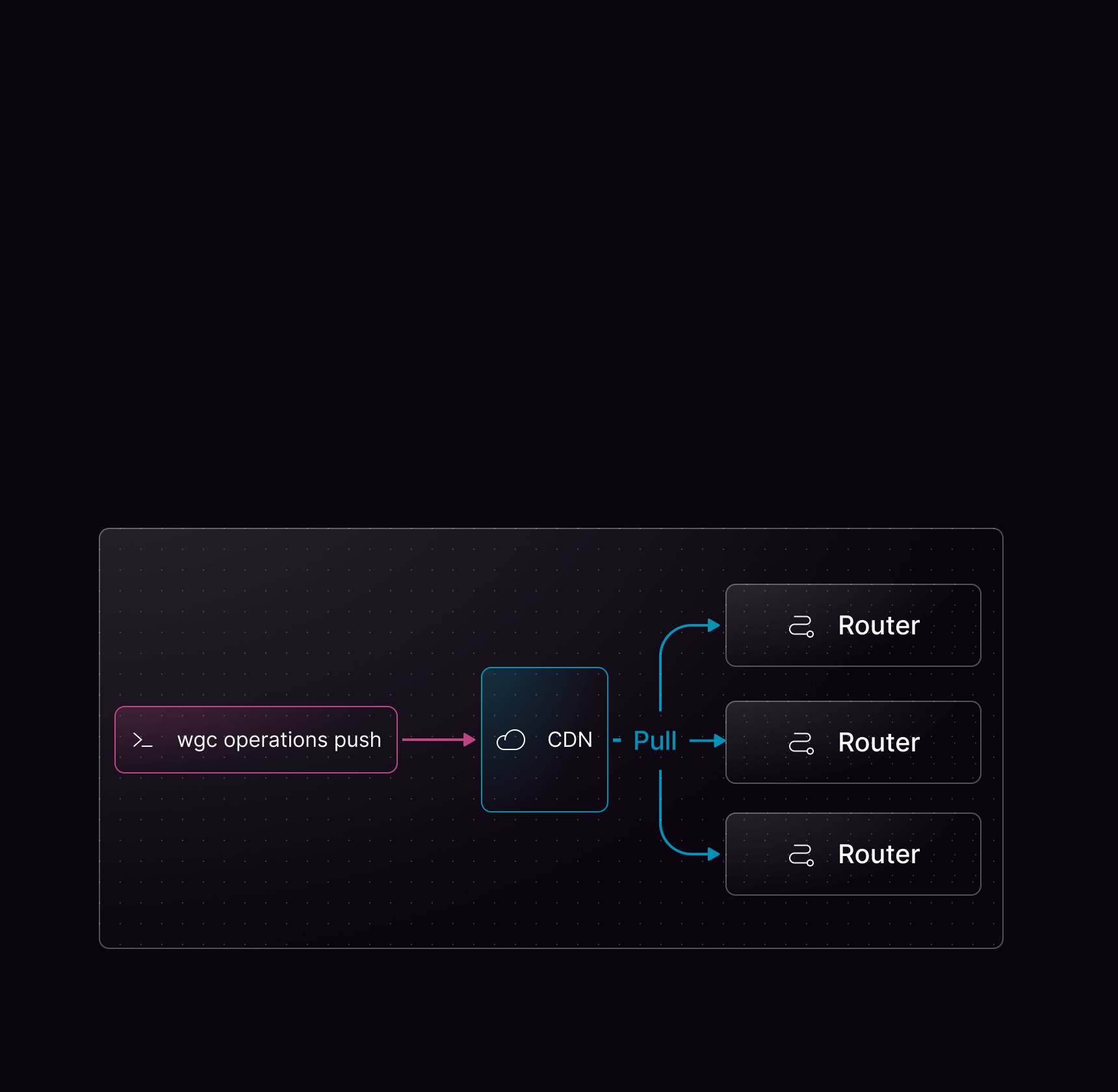 Persisted operations are usually registered within Cosmo during your release pipeline, which pushes them to the control plane. This allows you to use GraphQL queries without previously registering them in development while allowing only trusted operations in production.
The control plane replicates these operations in the Cosmo CDN, where the routers can fetch them. All operations in the CDN are protected and only readable by routers running the federated graph to which the operations were registered.
## Using persisted operations
Persisted operations require some tooling on the client side. Consult the documentation for your GraphQL client library to find out how to generate a query manifest or query map.
Once this list of operations has been generated, typically in your CI or CD pipeline, you can use [`wgc`](/cli/intro) to register your operations:
```bash theme={null}
wgc operations push mygraph -n default -c web -f my-operations-manifest.json
```
This will register the operations for your federated graph named `mygraph` in the `default` namespace (as seen in the Studio) and your client named `web` (indicated by the `graphql-client-name` HTTP header), using the same operation identifiers as your library when possible. If your library doesn't generate these identifiers, Cosmo will automatically generate them.
When pushing the operations, you will see a short summary of the operations that were pushed, indicating how many were created and how many were already registered. Alternatively, the `--output` flag can be used to obtain a JSON summary that can easily be processed by your tooling.
```bash theme={null}
wgc operations push mygraph -n default -c my-client -f persisted-query-manifest.json --format json (11-25 10:23)
{
"2d9df67f96ce804da7a9107d33373132a53bf56aec29ef4b4e06569a43a16935": {
"body": "query Employees {\n employees {\n id\n role {\n department\n title\n __typename\n }\n details {\n forename\n surname\n location\n __typename\n }\n __typename\n }\n}",
"status": "up_to_date"
},
...
}
```
Finally, you should enable persisted operations in your GraphQL client library.
To see all available options for `wgc operations push`, see [Push](/cli/operations/push).
Additionally, check the [Using Persisted Operation with Federated GraphQL](/tutorial/using-persisted-operations) tutorial for a step-by-step guide.
## Deleting persisted operations in Studio
You can delete persisted operations directly in Cosmo Studio after they have been uploaded via `wgc operations push`.
1. Open your federated graph in Studio.
2. Go to **Clients**.
3. Open a client and click **View Operations**.
4. Expand the operation and click the delete button.
5. Confirm in the delete dialog.
Only organization users with `organization-admin` or `organization-developer` roles can delete operations.
Operations are currently deleted one at a time from the UI.
Studio always asks for confirmation before deleting operations. If traffic is detected for the selected operation, the dialog warns that the operation is receiving traffic. If analytics data is unavailable, Studio cannot guarantee that existing clients won't break. You can always check the metrics using the link in the dialog.
## Disallowing non-persisted Operations
If you're going all in on Security, you'd want to only allow Persisted Operations in your Production Environment.
By default, non-persisted (dynamic) GraphQL Operations are allowed, which you can disable using the [Security Configuration](/router/configuration#security) of the Router.
We expose 4 different types of persisted operation blocking in the configuration:
1. **Allow all operations** (Default) — Both persisted and dynamic operations are permitted.
2. **Log unknown operations** — Any operation that has not been persisted will be logged, but not blocked.
3. **Safelist** — Operations that have been explicitly persisted will be allowed, based on matching the query body against persisted queries.
4. **Block non-persisted operations** — Fully enforced blocking of non-persisted operations, clients are required to send a pre-computed SHA-256 hash instead of a query body.
### Migration path to enforcing persisted operations
To migrate from allowing all operations to a more restrictive option incrementally, we recommend following these steps:
This will log when clients use operations that have not been persisted, helping you identify which operations to persist.
```bash config.yaml theme={null}
persisted_operations:
log_unknown:
enabled: true
```
This will allow users to send operations with any query body, but only execute if they match a persisted operation.
```bash config.yaml theme={null}
persisted_operations:
log_unknown: true
safelist:
enabled: true
```
This will block all non-persisted operations, requiring clients to send a pre-computed SHA-256 hash instead of a query body.
```bash config.yaml theme={null}
security:
block_non_persisted_operations:
enabled: true
```
#### Important Considerations
* **Whitespace sensitivity** Differences in whitespace can alter an operations hash, which will cause it to be rejected as an unknown operation. We recommend using `log_unknown_operations` before enabling full blocking.
* **Compatibility with Automatic Persisted Queries (APQ)** The `safelist` option cannot be used alongside APQ, as their functions are opposite.
Persisted operations are usually registered within Cosmo during your release pipeline, which pushes them to the control plane. This allows you to use GraphQL queries without previously registering them in development while allowing only trusted operations in production.
The control plane replicates these operations in the Cosmo CDN, where the routers can fetch them. All operations in the CDN are protected and only readable by routers running the federated graph to which the operations were registered.
## Using persisted operations
Persisted operations require some tooling on the client side. Consult the documentation for your GraphQL client library to find out how to generate a query manifest or query map.
Once this list of operations has been generated, typically in your CI or CD pipeline, you can use [`wgc`](/cli/intro) to register your operations:
```bash theme={null}
wgc operations push mygraph -n default -c web -f my-operations-manifest.json
```
This will register the operations for your federated graph named `mygraph` in the `default` namespace (as seen in the Studio) and your client named `web` (indicated by the `graphql-client-name` HTTP header), using the same operation identifiers as your library when possible. If your library doesn't generate these identifiers, Cosmo will automatically generate them.
When pushing the operations, you will see a short summary of the operations that were pushed, indicating how many were created and how many were already registered. Alternatively, the `--output` flag can be used to obtain a JSON summary that can easily be processed by your tooling.
```bash theme={null}
wgc operations push mygraph -n default -c my-client -f persisted-query-manifest.json --format json (11-25 10:23)
{
"2d9df67f96ce804da7a9107d33373132a53bf56aec29ef4b4e06569a43a16935": {
"body": "query Employees {\n employees {\n id\n role {\n department\n title\n __typename\n }\n details {\n forename\n surname\n location\n __typename\n }\n __typename\n }\n}",
"status": "up_to_date"
},
...
}
```
Finally, you should enable persisted operations in your GraphQL client library.
To see all available options for `wgc operations push`, see [Push](/cli/operations/push).
Additionally, check the [Using Persisted Operation with Federated GraphQL](/tutorial/using-persisted-operations) tutorial for a step-by-step guide.
## Deleting persisted operations in Studio
You can delete persisted operations directly in Cosmo Studio after they have been uploaded via `wgc operations push`.
1. Open your federated graph in Studio.
2. Go to **Clients**.
3. Open a client and click **View Operations**.
4. Expand the operation and click the delete button.
5. Confirm in the delete dialog.
Only organization users with `organization-admin` or `organization-developer` roles can delete operations.
Operations are currently deleted one at a time from the UI.
Studio always asks for confirmation before deleting operations. If traffic is detected for the selected operation, the dialog warns that the operation is receiving traffic. If analytics data is unavailable, Studio cannot guarantee that existing clients won't break. You can always check the metrics using the link in the dialog.
## Disallowing non-persisted Operations
If you're going all in on Security, you'd want to only allow Persisted Operations in your Production Environment.
By default, non-persisted (dynamic) GraphQL Operations are allowed, which you can disable using the [Security Configuration](/router/configuration#security) of the Router.
We expose 4 different types of persisted operation blocking in the configuration:
1. **Allow all operations** (Default) — Both persisted and dynamic operations are permitted.
2. **Log unknown operations** — Any operation that has not been persisted will be logged, but not blocked.
3. **Safelist** — Operations that have been explicitly persisted will be allowed, based on matching the query body against persisted queries.
4. **Block non-persisted operations** — Fully enforced blocking of non-persisted operations, clients are required to send a pre-computed SHA-256 hash instead of a query body.
### Migration path to enforcing persisted operations
To migrate from allowing all operations to a more restrictive option incrementally, we recommend following these steps:
This will log when clients use operations that have not been persisted, helping you identify which operations to persist.
```bash config.yaml theme={null}
persisted_operations:
log_unknown:
enabled: true
```
This will allow users to send operations with any query body, but only execute if they match a persisted operation.
```bash config.yaml theme={null}
persisted_operations:
log_unknown: true
safelist:
enabled: true
```
This will block all non-persisted operations, requiring clients to send a pre-computed SHA-256 hash instead of a query body.
```bash config.yaml theme={null}
security:
block_non_persisted_operations:
enabled: true
```
#### Important Considerations
* **Whitespace sensitivity** Differences in whitespace can alter an operations hash, which will cause it to be rejected as an unknown operation. We recommend using `log_unknown_operations` before enabling full blocking.
* **Compatibility with Automatic Persisted Queries (APQ)** The `safelist` option cannot be used alongside APQ, as their functions are opposite.