> ## Documentation Index
> Fetch the complete documentation index at: https://wundergraphinc-brendan-add-sof-link.mintlify.site/llms.txt
> Use this file to discover all available pages before exploring further.
# Graph Pruning
> **Graph Pruning Linter** helps manage the cleanliness and efficiency of your GraphQL schema by running various checks on the schema. When enabled, the lint check will be performed on every [check](https://cosmo-docs.wundergraph.com/cli/subgraph/check) operation of that namespace.
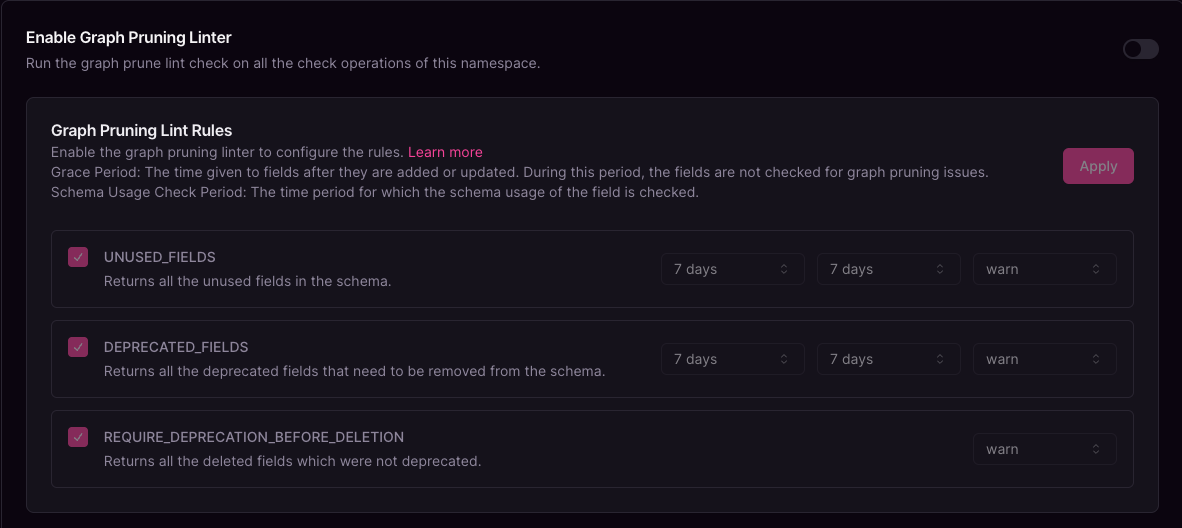 ## Rules
1. UNUSED\_FIELDS
* Identifies and lists all fields that are not being used in the schema.
2. DEPRECATED\_FIELDS
* Detects fields that have been deprecated but have not yet been removed from the schema.
3. REQUIRE\_DEPRECATION\_BEFORE\_DELETION
* Identifies fields that were deleted without being marked as deprecated beforehand.
## Rule Configurations
### Severity Level
* Error:- If any configured rules are violated, it causes the check operation to fail.
* Warning:- If any configured rules are violated, they are flagged as warnings, but they don't cause the check operation to fail.
### Grace Period
This is the time period provided to the fields modified on schema publications, allowing time before enforcing these rules during checks.
### Schema Usage Check Period (Enterprise only)
* This is the time period used to check the usage of the field.
* For non-enterprise customers, the value is determined by the limits imposed on the organization according to its current billing plan.
## How to configure graph pruning linter
Navigate to the Lint Policy page on Cosmo.
Select the namespace.
Enable the graph pruning linter.
Configure the linter rules:
* Check the checkbox to enable each rule.
* Select the **severity level** (Warning or Error) for each rule.
* Set the **grace period** for fields that are modified upon schema publication, allowing time before enforcing these rules during checks.
* Configure the **schema usage check period** (available only for enterprise customers).
## Rules
1. UNUSED\_FIELDS
* Identifies and lists all fields that are not being used in the schema.
2. DEPRECATED\_FIELDS
* Detects fields that have been deprecated but have not yet been removed from the schema.
3. REQUIRE\_DEPRECATION\_BEFORE\_DELETION
* Identifies fields that were deleted without being marked as deprecated beforehand.
## Rule Configurations
### Severity Level
* Error:- If any configured rules are violated, it causes the check operation to fail.
* Warning:- If any configured rules are violated, they are flagged as warnings, but they don't cause the check operation to fail.
### Grace Period
This is the time period provided to the fields modified on schema publications, allowing time before enforcing these rules during checks.
### Schema Usage Check Period (Enterprise only)
* This is the time period used to check the usage of the field.
* For non-enterprise customers, the value is determined by the limits imposed on the organization according to its current billing plan.
## How to configure graph pruning linter
Navigate to the Lint Policy page on Cosmo.
Select the namespace.
Enable the graph pruning linter.
Configure the linter rules:
* Check the checkbox to enable each rule.
* Select the **severity level** (Warning or Error) for each rule.
* Set the **grace period** for fields that are modified upon schema publication, allowing time before enforcing these rules during checks.
* Configure the **schema usage check period** (available only for enterprise customers).